
Welcome to Part 1 of our eight-part guide, Getting started with GitLab Duo Agent Platform, where you'll master building and deploying AI agents and workflows within your development lifecycle. Follow tutorials that take you from your first interaction to production-ready automation workflows with full customization.
GitLab Duo Agent Platform represents a fundamental shift in how developers interact with AI during the software development lifecycle. Moving beyond code into full SDLC context, GitLab Duo Agent Platform enables multiple specialized AI agents to work alongside your team, handling complex tasks asynchronously while you focus on innovation and problem-solving.
The AI Paradox: Developer experience vs. enterprise governance
As developers adopt AI tools like Claude and Codex, they generate code faster than ever. But when agents run on developer laptops or external clouds, organizations lose visibility and control. Code review durations increase, pipeline failures multiply, and vulnerability backlogs grow. Security and compliance standards become difficult to enforce on AI-generated code, and there's no clear audit trail of who approved what.
This is what GitLab Duo Agent Platform solves. One orchestration layer that runs repo-side, within your GitLab environment, with your guardrails, following your policies, where every agentic action is traceable. And it runs your choice of agents: Claude, Codex, Duo, on all the popular foundation models. You get powerful AI acceleration without sacrificing enterprise governance and security.
What is GitLab Duo Agent Platform?
GitLab Duo Agent Platform is an AI orchestration layer that enables:
- Asynchronous collaboration between developers and specialized AI agents
- Full SDLC context across code, issues, epics, merge requests, CI/CD pipelines, wikis, analytics, and security scans
- Multi-agent flows where many agents collaborate in parallel on complex tasks
- Intelligent automation that understands your organization's standards, practices, and compliance requirements
Think of it as adding AI team members who can take on entire workflows, from understanding requirements to creating merge requests, while you maintain full visibility and control.
🎯 Try GitLab Duo Agent Platform today!
Platform architecture
GitLab Duo Agent Platform consists of several interconnected components working together to provide comprehensive AI assistance. The diagram below shows the different ways you can interact with agents and workflows across your development environment:
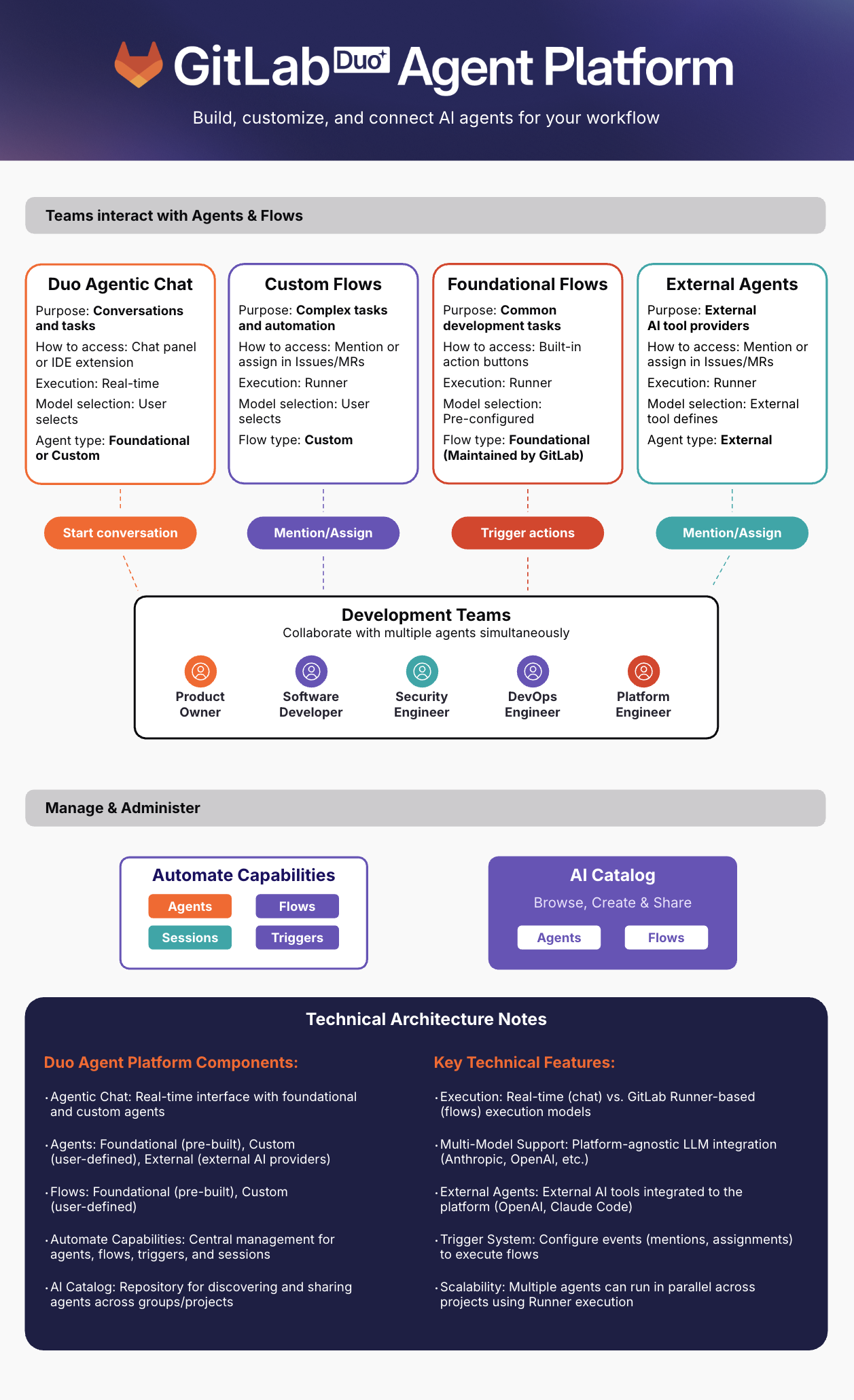 GitLab Duo Agent Platform architecture diagram
How teams interact with GitLab Duo Agent Platform
- GitLab Duo Agentic Chat — Open the chat panel in the GitLab UI or your IDE for interactive conversations with foundational and custom agents. Select from available LLMs and get real-time help.
- GitLab Duo CLI — Access agents and workflows from the terminal for automated execution and interactive chat mode.
- Custom Flows — User-defined workflows you create for team-specific automation. Use custom flows to automate repetitive tasks, enforce organizational standards, and orchestrate multi-agent workflows tailored to your unique development processes.
- Foundational Flows — Pre-built workflows built and maintained by GitLab for common development tasks, including Software Development, Developer, Fix CI/CD Pipeline, Convert to GitLab CI/CD, Code Review, SAST Vulnerability Resolution, SAST false positive detection, and Secret false positive detection.
- External Agents — AI agents from external providers that integrate with GitLab. GitLab-managed agents (Claude Code, OpenAI Codex) use GitLab credentials with no additional setup required. User-managed agents (Amazon Q, Gemini) require you to provide your own credentials. Trigger them by mentioning or assigning them in issues, epics and merge requests to leverage specialized AI capabilities alongside your development workflow.
Where to manage and discover
- AI Catalog — Browse, create, and share agents, flows, and MCP servers across your organization. MCP servers can connect custom agents to external data sources and third-party services (like Atlassian Jira, Linear, and Context7). Discover and add solutions created by GitLab and your team, or publish your own for others to use.
- AI Management — Your central hub for managing everything. Access from the left sidebar under AI to view and manage your agents and flows, review activities in sessions, and access MCP servers associated with the agents enabled in your project.
Let's explore each component briefly (we'll dive deeper in subsequent posts):
GitLab Duo Agentic Chat
Your primary interface for interacting with agents. Available as a persistent panel in the GitLab UI and in your IDE. Learn more in Part 2: Getting Started with GitLab Duo Agentic Chat.
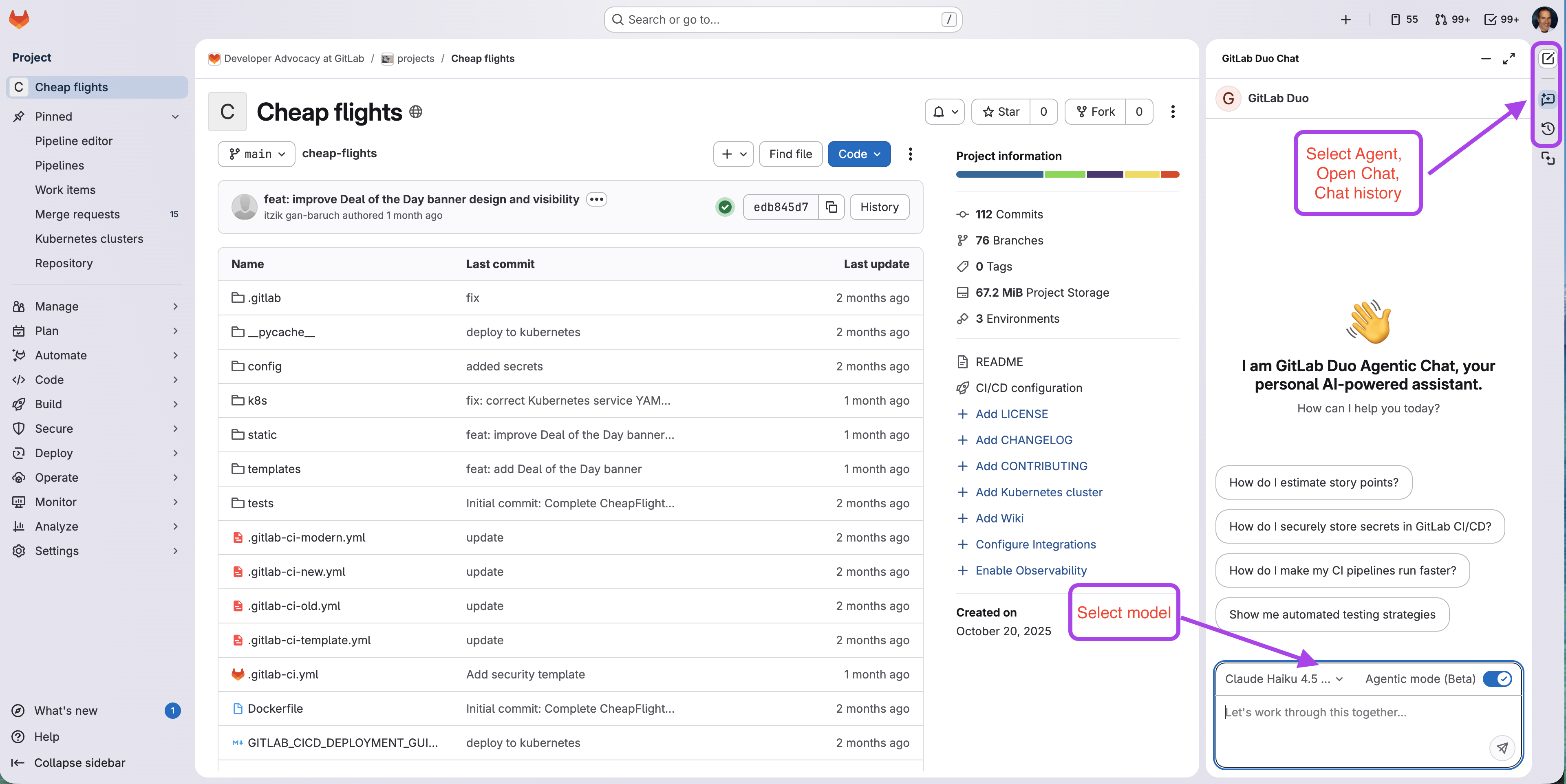 GitLab Duo Agentic Chat panel in the web UI
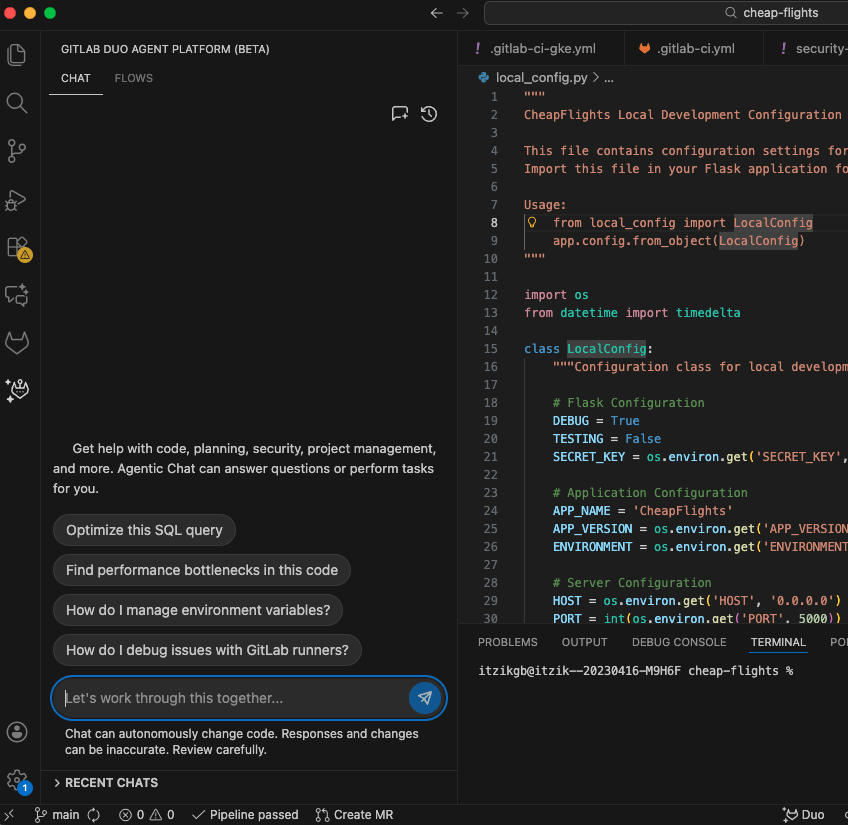 GitLab Duo Agentic Chat panel in VS Code
Agents
Agents are specialized AI-powered assistants designed to handle specific tasks throughout your development workflow. Think of them as team members with unique expertise and capabilities.
| Type | Description | Where Used | Setup Required |
|---|---|---|---|
| Foundational | Maintained by GitLab for common development workflows (GitLab Duo, Planner, Security Analyst, Data Analyst, CI Expert), available by default in the chat of any project | Duo Chat, Duo CLI | No |
| Custom | Created by you for team-specific needs with custom prompts and tools | Duo Chat, Duo CLI | Yes |
| External | External AI providers (Claude, OpenAI) triggered via mentions or assignments | @mentions, assignments | Optional |
About external agents
External agents run in the background on GitLab platform compute when triggered by mentions (e.g., @ai-codex) or assignments in issues and merge requests. Unlike foundational and custom agents that use synchronous feedback loops, external agents execute asynchronously, enabling powerful automation with specialized AI providers.
What makes agents powerful
- Specialized prompts: Each agent has a unique system prompt that defines its expertise, behavior, and communication style.
- Access to tools: Agents can read files, access issues/MRs/epics, search code, analyze CI/CD job logs and vulnerability reports, and more based on their configuration.
- Project context: Access to issues, merge requests, code, CI/CD pipelines, and security vulnerabilities.
Learn more in Part 3: Understanding agents. Discover how to create custom agents, integrate external AI providers, and configure agent prompts and tools for your team's specific needs.
Flows
Flows are multi-step workflows that combine multiple actions to solve complex problems. Unlike agents that respond to questions, flows execute complete workflows autonomously via runner execution.
| Type | Description | Setup Required |
|---|---|---|
| Foundational | Maintained by GitLab for common development workflows, including Software Development, Developer, Fix CI/CD Pipeline, Convert to GitLab CI/CD, Code Review, SAST Vulnerability Resolution, SAST false positive detection, and Secret false positive detection — triggered via UI buttons or IDEs | No |
| Custom | User-defined workflows you create, tailored to your needs | Yes |
What makes flows powerful
- Multi-step execution: Combine multiple operations into a single workflow
- Asynchronous processing: Run in background while you continue working
- Full pipeline access: Execute via runner execution with complete project context
- Event-driven: Automatically triggered by GitLab events
Learn more in Part 4: Understanding flows, including multi-agent workflows.
Agents vs. flows: What's the difference?
Understanding when to use an agent vs. a flow is key to working effectively with GitLab Duo Agent Platform.
| Aspect | Agents (Interactive in Chat) | Flows (Automated on Platform) |
|---|---|---|
| Purpose | Interactive work, quick iterations, conversational guidance | Complex multi-step tasks, background automation, event-driven workflows |
| Where | GitLab Duo Chat (Web UI, IDEs), Duo CLI | Issues, Merge Requests, UI action buttons |
| How | Real-time conversation with ability to take actions | Triggered by events or button clicks |
| Execution | Interactive, runs immediately in chat context | Asynchronous via runner execution |
| Example | "Refactor this function" (agent modifies code), "Create tests" (agent generates test file) | "Generate MR for issue #123" (flow creates branch, commits, opens MR) |
Quick decision guide
- Working interactively or want instant feedback? → Use chat
- Need background automation, MR review, or complex multi-file tasks? → Use flow
Key insight
Both agents and flows can take actions and create code. The main difference is how they interact and run: Agents communicate interactively in your chat interface, while flows run asynchronously in the background on platform compute.
AI Catalog
A centralized library where you can browse, discover, create, and share agents and flows across your organization, detailed in Part 5: AI Catalog.
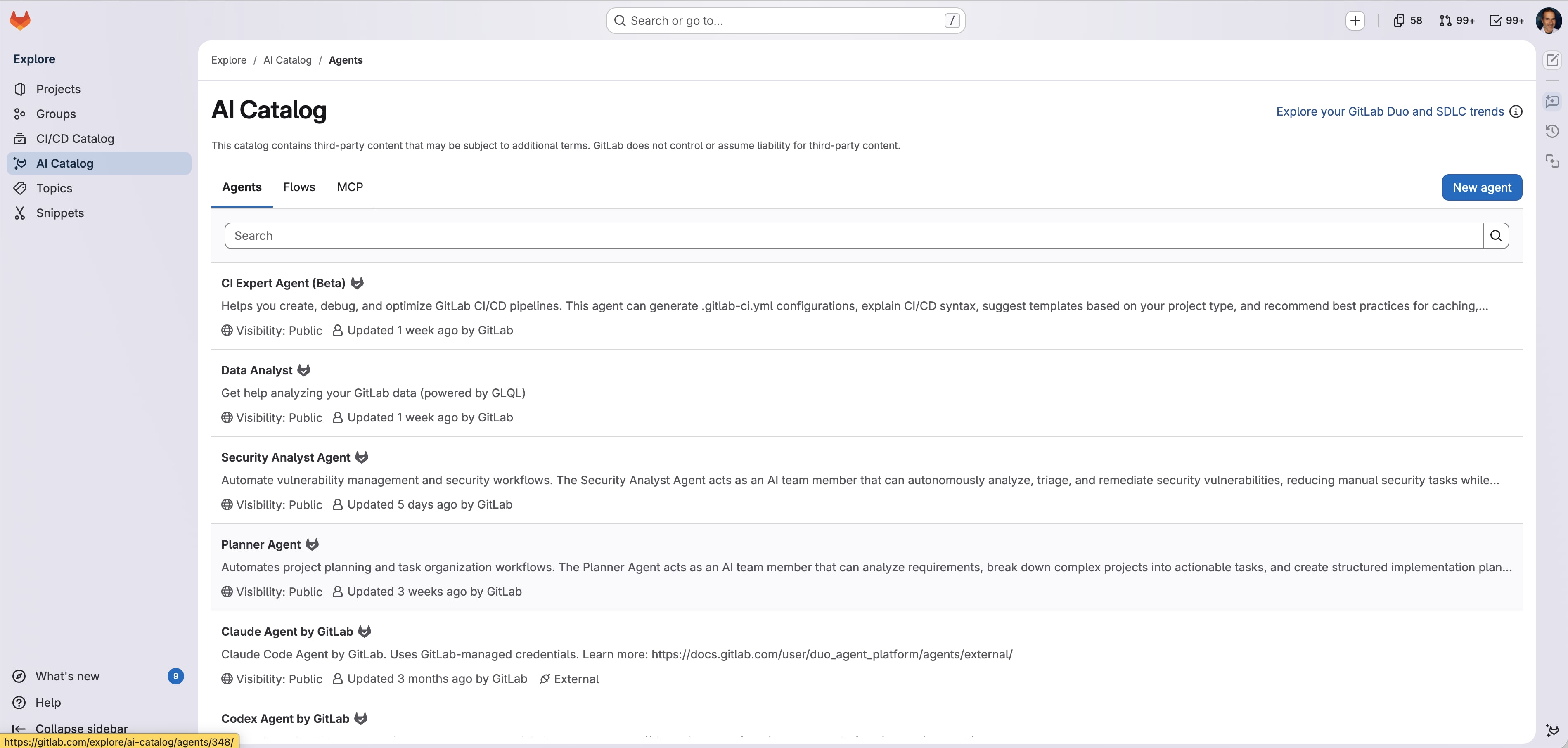 AI Catalog
Automate capabilities
Your hub for managing agent and flow workflows:
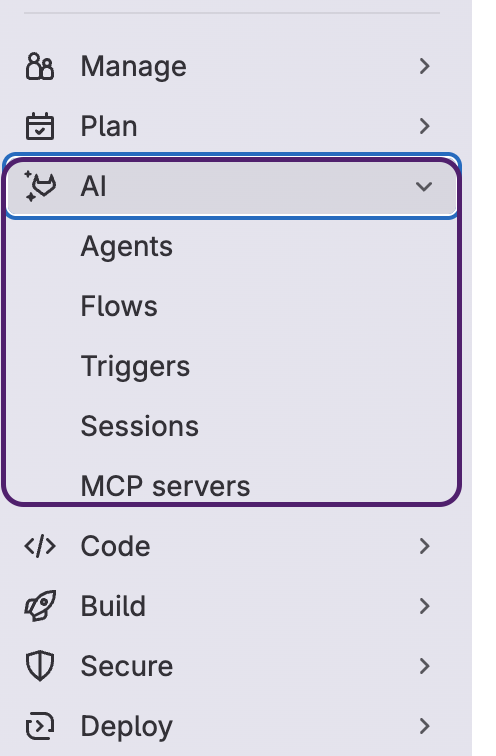 AI menu showing agents, flows, sessions, triggers, and MCP servers
- Agents: View and manage agents in your project, detailed in Part 3.
- Flows: View, create, and manage flows in your project, detailed in Part 4.
- Sessions: Agent activity logs
- Triggers: Event-based automation management for flows in your project
- MCP servers: View and manage Model Context Protocol servers connected to your agents, enabling integration with external data sources and third-party services
Understanding sessions
Every agent and flow execution creates a session that logs agentic activities. Sessions provide full transparency into what happened, including agent reasoning, execution details, tool calling, outputs, and the complete decision trail.
To view sessions: Navigate to your project > AI > Sessions. From there, you can access the pipeline console to see detailed execution logs.
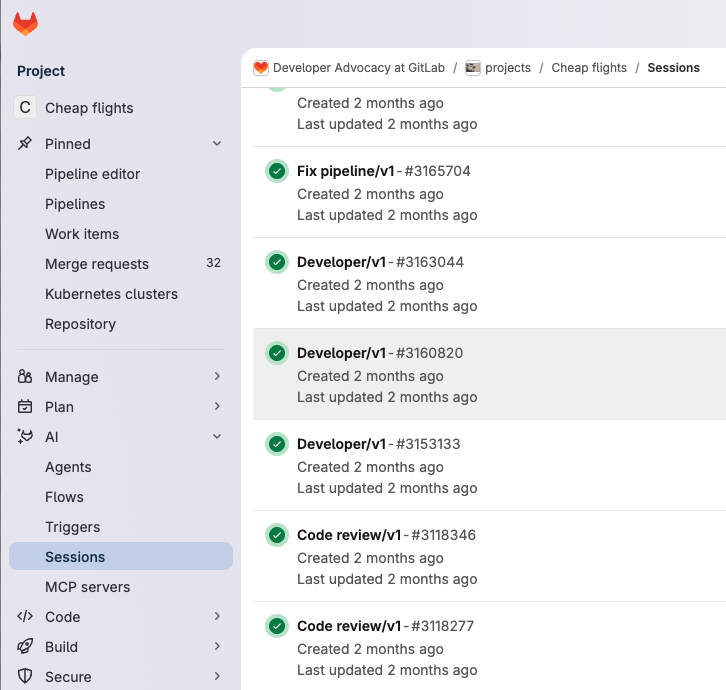 Sessions overview showing execution status and progress
Model selection
One of the powerful features of GitLab Duo Agent Platform is the ability to choose which AI model powers your conversation.
Available in: GitLab 18.4 and later
How to select:
- Open GitLab Duo Agentic Chat.
- Look for the model dropdown.
- Click to see available models.
- Select the model best suited for your task.
Note: Model selection is currently available in the Web UI only. IDE integration uses the default model selected for your group.
Your first agent interaction
Let's walk through a simple first interaction with GitLab Duo Agentic Chat:
Example 1: Understanding your project (Agent)
Scenario: You've just joined a project and need to understand its structure and architecture.
Steps:
- Open GitLab Duo Chat panel (click Duo icon in top-right).
- Ensure Agentic mode (Beta) is toggled on.
- Select the Duo Agent (default).
- Type: "Give me an overview of this project's architecture."
- Press Enter.
What happens:
The agent:
- Analyzes your repository structure
- Reviews your README, code organization, and documentation
- Provides a comprehensive overview with key components
You can ask follow-up questions for clarification.
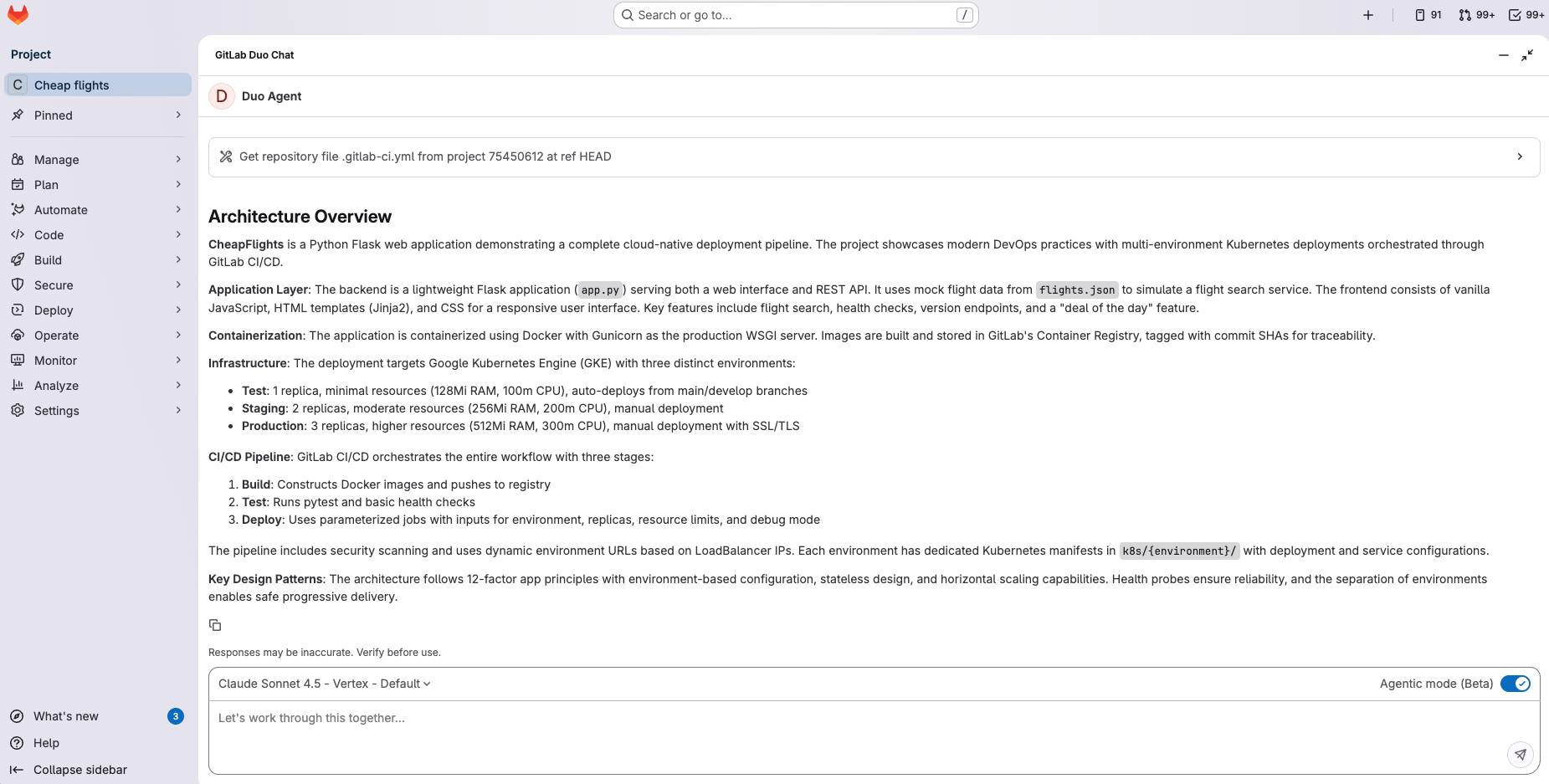 Chat showing Architecture Overview
Example 2: Generating a merge request (Flow)
Scenario: You have an issue that needs to be resolved with code changes.
Steps:
- Open the issue in GitLab.
- Click Generate MR with Duo button.
- An agent session starts.
- Within a few minutes, an MR is created with:
- Code changes across multiple files
- A descriptive commit message
- An explanation of changes in MR description
What happens:
The Developer Flow:
- Analyzes the issue
- Understands repository structure, design patterns, and SDLC context
- Makes appropriate code changes
- Opens a ready-to-review MR
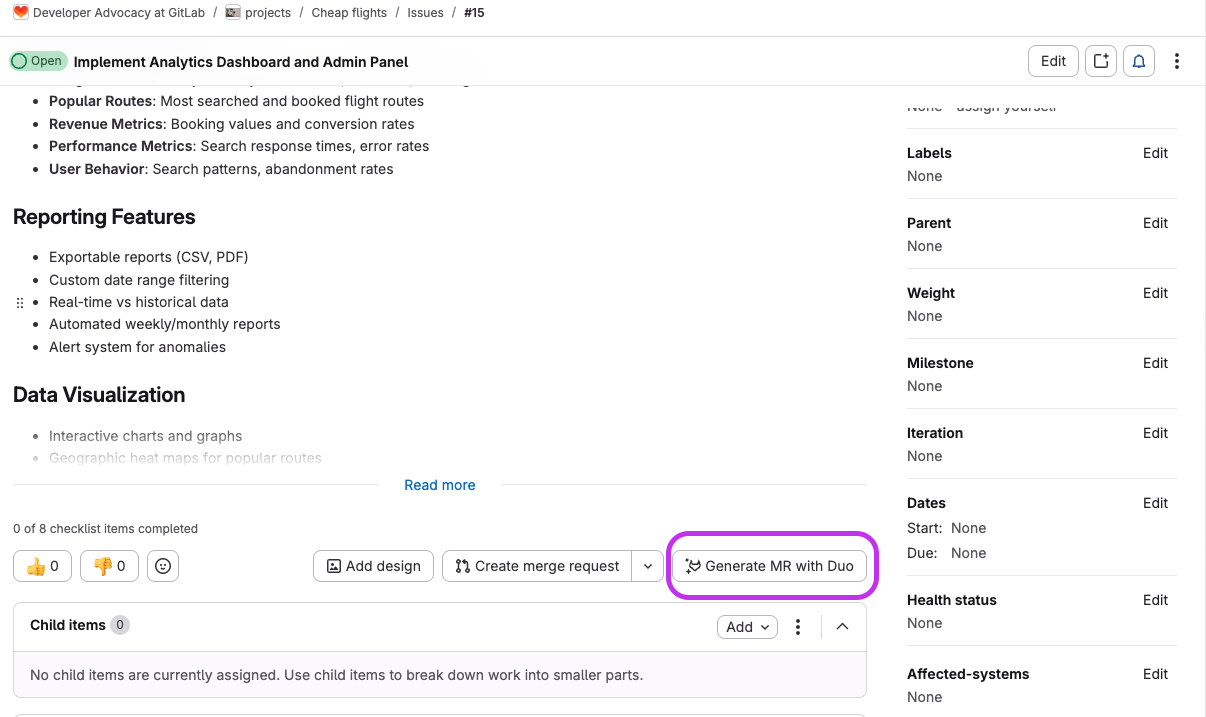 Issue with Generate MR with Duo button
Common questions
Q: Are my conversations with agents private?
A: Yes. Conversations follow GitLab's standard privacy and security models. Learn more.
Q: Can I use GitLab Duo Agent Platform with self-hosted models?
A: Yes, starting with GitLab 18.8, it requires additional setup. See GitLab documentation.
What's next?
Now that you understand the basics of GitLab Duo Agent Platform, you're ready to dive deeper into each component:
- Part 2: Getting started with GitLab Duo Agentic Chat — Master the persistent chat panel, learn model selection strategies, understand agent switching, and use chat effectively across Web UI and all supported IDEs.
- Part 3: Understanding agents — Explore foundational agents built by GitLab, create custom agents with specialized prompts for your team's workflows, and integrate external CLI agents from providers like Claude Code and OpenAI Codex.
- Part 4: Understanding flows — Discover how flows orchestrate multiple agents to solve complex problems, create custom YAML-defined workflows, and leverage external AI providers for automated pipeline execution.
- Part 5: AI Catalog — Browse the centralized repository to discover agents and flows created by GitLab and the community, add them to your projects, and publish your own solutions for others to use.
- Part 6: Monitor, manage, and automate AI workflows — Monitor all agent and flow activity through sessions, set up event-driven triggers to automate workflows, and manage your entire GitLab Duo Agent Platform ecosystem from one central location.
- Part 7: Model Context Protocol integration — Extend GitLab Duo's capabilities by connecting to external tools like Jira, Slack, and AWS through the open MCP standard, and enable external AI tools to access your GitLab data.
- Part 8: Customizing GitLab Duo Agent Platform - Configure custom chat rules, create system prompts for agents, set up agent tools, integrate external systems with MCP, and customize flows for your team's specific needs.