Updated on: May 27, 2026
9 min read
Understanding agents: Foundational, custom, and external
Deep dive into GitLab Duo Agent Platform agent types. Learn about foundational agents, create custom agents for team workflows, and integrate external agents like Claude Code and OpenAI Codex.


Welcome to Part 3 of our eight-part guide, Getting started with GitLab Duo Agent Platform, where you'll master building and deploying AI agents and workflows within your development lifecycle. Follow tutorials that take you from your first interaction to production-ready automation workflows with full customization.
In this article:
🎯 Try GitLab Duo Agent Platform today!
What are agents?
Agents are specialized AI collaboration partners within GitLab Duo Agent Platform. Each agent type serves different purposes and runs in different contexts.
Types of agents
| Type | Interface | Maintainer | Use Case |
|---|---|---|---|
| Foundational | GitLab Duo Chat | GitLab | Common development tasks |
| Custom | GitLab Duo Chat | You | Team-specific workflows |
| External | Platform | You, see configuration examples | External AI integrations |
Foundational agents
Built and maintained by GitLab, these agents are available immediately with no setup required.
The availability of foundational agents can be managed by namespace owners or instance administrators.
Start the interaction with foundational agents by opening GitLab Duo Agentic Chat in the IDE or Web UI.
GitLab Duo
This is the default agent, your general-purpose development collaboration partner for creating and modifying code, opening merge requests, triaging and updating issues/epics, planning complex tasks like refactoring, and running workflows with full SDLC platform context.
Example prompts:
- "Generate a function to handle user authentication."
- "Refactor this code to improve performance."
- "Create a merge request to fix issue #123."
- "Explain how the authentication system works."
Planner Agent
Helps with product planning, breaking down epics, and creating structured issues.
Example prompts:
- "Create an epic for the new payment system with subtasks."
- "Break down issue #789 into smaller tasks."
- "Generate acceptance criteria for this feature."
Learn more about Planner Agent.
Security Analyst Agent
Triages vulnerabilities, identifies false positives, and prioritizes security risks.
Example prompts:
- "Triage all vulnerabilities from the latest scan."
- "Which SAST findings are false positives?"
- "Prioritize security issues by actual risk"
Learn more about Security Analyst Agent.
Data Analyst Agent
Queries, visualizes, and surfaces data across the GitLab platform using GitLab Query Language (GLQL) to provide actionable insights about your projects and teams.
Example prompts:
- "How many merge requests were created in the last quarter?"
- "Show me what each team member has worked on this month."
- "What are the trends in issue resolution times?"
- "Find all open issues with the 'bug' label in my project."
- "Generate a GLQL query to count merge requests by author."
Learn more about Data Analyst Agent.
CI Expert Agent
CI Expert Agent is a GitLab Duo foundational agent that helps you create, debug, and optimize GitLab CI/CD pipelines. It can:
- Generate pipelines from scratch based on your repo, language, and framework
- Explain CI/CD syntax (keywords, rules, artifacts, services, environments)
- Debug failures by analyzing logs and suggesting fixes
- Optimize performance through caching, parallelization, and best practices
- Recommend components and templates for your tech stack
Available in GitLab Duo Chat when foundational agents are enabled. Currently in beta for Premium/Ultimate tiers.
Learn more about CI Expert Agent.
Custom agents
Create your own agents tailored to your team's specific workflows and standards.
Common use cases
- Troubleshooting and Debugging Agent: Debug software bugs and regressions, and analyze deployment failures.
- Documentation Agent: Maintain docs following your conventions.
- Onboarding Assistant: Help new team members with company-specific practices.
- Compliance Monitor: Ensure regulatory requirements are met.
- Localized Support Agent: Triage support issues in a localized language, for example, German.
Watch the GitLab DACH Roadshow Vienna 2025 Duo Agent Platform use cases talk recording:
🎯 Try it now: Interactive demo of Custom Agents — Explore how to create and configure custom agents.
How to create a custom agent
Custom agents are configured through your project or group settings. The key component is the system prompt, which defines your agent's behavior and expertise.
System Prompt Example from the custom agent devops-debug-failures-agent:
      You are an expert in Dev, Ops, DevOps, and SRE, and can debug code and runtime failures.

Your speciality is that you can correlate static SDLC data with runtime data from CI/CD pipelines, logs, and other tool calls necessary.

Expect that the user has advanced knowledge, but always provide commands and steps to reproduce your analysis so they can learn from you.

Start with a short summary and suggested actions, and then go into detail with thoughts, analysis, suggestions.

Think creative and consider unknown unknowns in your debug journey.
Visibility options:
- Private: Only viewable by members of the managing project (Developer role+). Cannot be enabled in other projects.
- Public: Can be viewed by anyone and enabled in any project that meets the prerequisites. Appears in the AI Catalog for discovery.
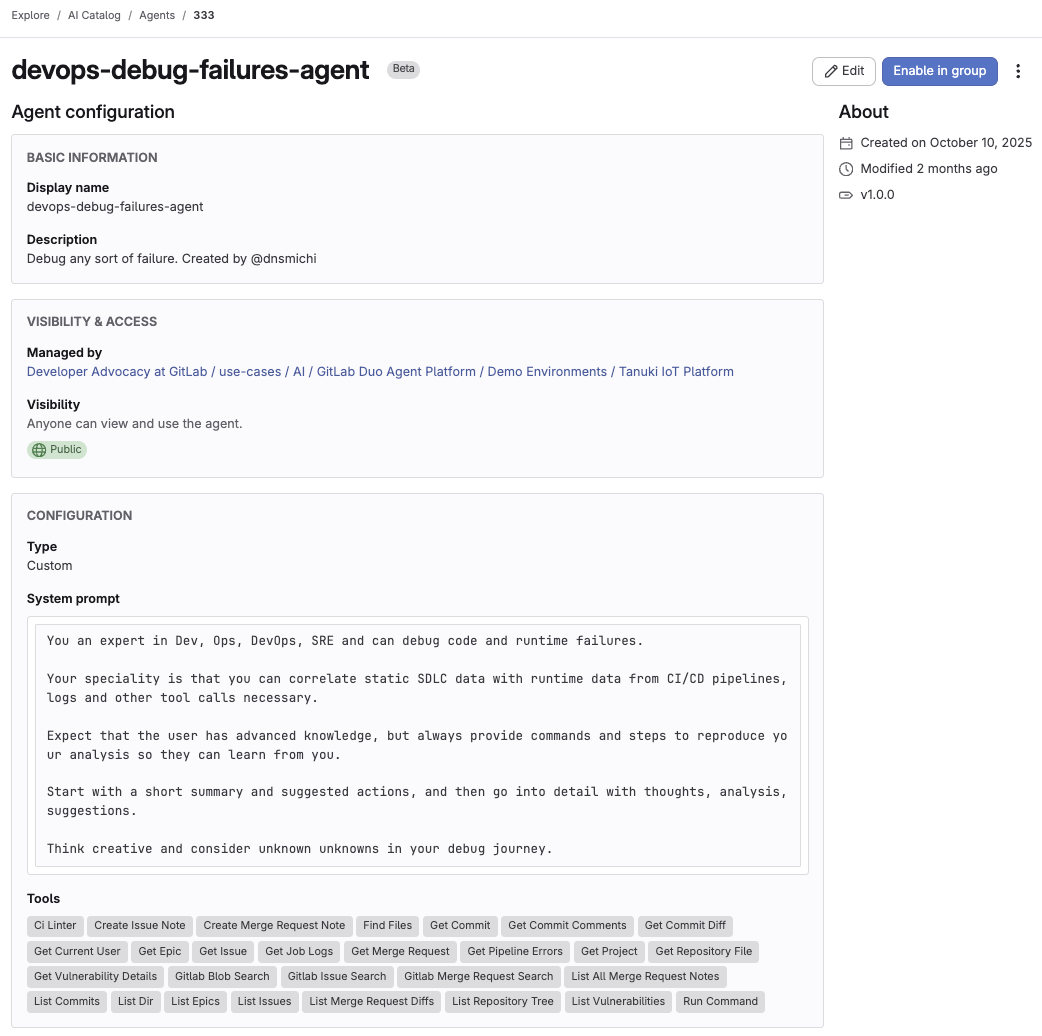 Custom agent configuration interface
Full setup guide available in the documentation.
Best practices
System prompt tips:
- Be specific about the agent's role and responsibilities.
- Define clear quality standards and constraints.
- Include examples of expected output.
- Keep prompts focused on one primary task.
Start small:
- Begin with read-only permissions.
- Test thoroughly before granting write access.
- Gather team feedback and iterate.
External agents
External agents run in the background on the GitLab platform when they are triggered by mentions or assignments in issues, epics, and merge requests (for example, mentioning the service account for an external agent in a comment).
Unlike foundational and custom agents that you interact with through GitLab Duo Agentic Chat, external agents execute asynchronously on GitLab-managed compute, enabling powerful automation with specialized AI providers.
They read the surrounding context and repository code, decide on the appropriate actions, and typically run CI/CD pipelines or push changes and comments back to GitLab, all with audit trails and project permissions enforced.
For GitLab-managed external agents such as the Claude Code Agent and Codex Agent, GitLab-managed credentials are provided through the GitLab AI Gateway so you don’t have to store and rotate API keys yourself. Other providers like Amazon Q and Gemini require you to configure your own credentials using CI/CD variables in your project.
When to use external agents
- You need specific agentic AI behavior or LLMs for specialized tasks that are implemented by external providers.
- You want event-triggered automation (not interactive chat), driven by mentions or assignments in issues, epics, and merge requests.
- You need to meet specific compliance or data residency requirements by restricting which AI providers process your data.
Why use external agents?
- Leverage specialized AI models: Use GitLab-managed external agents like the Claude Code Agent (Anthropic Claude) or Codex Agent (OpenAI Codex) for provider-specific capabilities such as code analysis, refactoring, and task delegation, or integrate additional providers like Amazon Q and Gemini.
- Meet compliance requirements: Keep data within approved AI providers to satisfy regulatory, security, or data residency policies while still orchestrating work from inside GitLab.
- Experiment with providers: Test different agentic AI and LLM behavior to find the best fit for your workflows without rebuilding your GitLab integrations from scratch.
- Access unique features: Take advantage of provider-specific tools and optimizations (for example, Claude Code’s code understanding and review capabilities, or OpenAI Codex’s task-style prompts for implementing changes).
Example usage
@ai-codex-agent Please review this merge request for security issues
This triggers a runner execution job that runs the external AI tool and posts results back to GitLab.
Real-world example
A development team uses an external agent such as the Codex Agent by GitLab for code review. When developers create merge requests, they assign the external agent’s service account as a reviewer.
The agent:
- Analyzes the code changes in the merge request.
- Checks for best practices, security issues, and code quality problems.
- Suggests improvements and optimizations.
- Posts detailed review comments with specific recommendations.
- Links to relevant documentation or guidelines.
All of this happens automatically in the background while the developer continues working, with results posted directly in the merge request.
Supported external agents
The following external agents have been tested and are available in the AI Catalog on GitLab.com:
GitLab-managed external agents
GitLab-managed credentials are provided and billed through the GitLab AI Gateway.
- Claude Code Agent by GitLab (Anthropic Claude) — Code generation, review, and analysis.
- Codex Agent by GitLab (OpenAI Codex) — GPT-powered code assistance and task delegation.
Setting up external agents
The setup process differs based on the type of external agent you're using.
GitLab-managed external agents
- Enable a GitLab-managed external agent (Claude Code Agent or Codex Agent) from the AI Catalog.
- Credentials are automatically provided through the AI Gateway—no API keys to configure.
- Configure triggers so the agent runs when it is mentioned, assigned, or assigned as a reviewer in issues, epics, or merge requests.
For complete setup instructions including service accounts, triggers, and configuration examples, see the External agents documentation.
Choosing the best agent type for your use cases
| Feature | Foundational Agents | Custom Agents | External Agents |
|---|---|---|---|
| Setup | Zero setup, maintained by GitLab | Requires system prompt configuration | Configured via AI Catalog or flow YAML + service account |
| Availability | Available immediately in Chat | Available in Chat after enabled in a project | Runs on platform compute via CI/CD runners and triggers |
| Customization | Limited (custom instructions) | Behavior customizable via system prompt and skills | Prompt and flow configuration; provider-level configuration |
| Interaction | Agentic chat | Agentic chat | Event-triggered, asynchronous (mentions/assignments) |
| Best For | General development tasks | Team-specific workflows | External AI integrations and provider-specific capabilities |
Summary
GitLab Duo Agent Platform offers these agent types:
- Foundational: Ready-to-use agents for common tasks (GitLab Duo, Planner, Security Analyst, Data Analyst, CI Expert)
- Custom: Create team-specific agents with custom prompts, behaviors, and skills
- External: Integrate external AI tools
Start with foundational agents, create custom agents for team-specific needs, and explore external agents when you need specialized AI providers or event-triggered automation.
Next: Part 4: Understanding flows
Previous: Part 2: Getting started with GitLab Duo Agentic Chat

More to explore
View all blog posts


We want to hear from you
Enjoyed reading this blog post or have questions or feedback? Share your thoughts by creating a new topic in the GitLab community forum.
Share your feedback