Published on: April 9, 2026
14 min read
5 ways GitLab pipeline logic solves real engineering problems
Learn how to scale CI/CD with composable patterns for monorepos, microservices, environments, and governance.

Most CI/CD tools can run a build and ship a deployment. Where they diverge is what happens when your delivery needs get real: a monorepo with a dozen services, microservices spread across multiple repositories, deployments to dozens of environments, or a platform team trying to enforce standards without becoming a bottleneck.
GitLab's pipeline execution model was designed for that complexity. Parent-child pipelines, DAG execution, dynamic pipeline generation, multi-project triggers, merge request pipelines with merged results, and CI/CD Components each solve a distinct class of problems. Because they compose, understanding the full model unlocks something more than a faster pipeline. In this article, you'll learn about the five patterns where that model stands out, each mapped to a real engineering scenario with the configuration to match.
The configs below are illustrative. The scripts use echo commands to keep the signal-to-noise ratio low. Swap them out for your actual build, test, and deploy steps and they are ready to use.
1. Monorepos: Parent-child pipelines + DAG execution
The problem: Your monorepo has a frontend, a backend, and a docs site. Every commit triggers a full rebuild of everything, even when only a README changed.
GitLab solves this with two complementary features: parent-child pipelines (which let a top-level pipeline spawn isolated sub-pipelines) and DAG execution via needs (which breaks rigid stage-by-stage ordering and lets jobs start the moment their dependencies finish).
A parent pipeline detects what changed and triggers only the relevant child pipelines:
      # .gitlab-ci.yml
stages:
  - trigger

trigger-services:
  stage: trigger
  trigger:
    include:
      - local: '.gitlab/ci/api-service.yml'
      - local: '.gitlab/ci/web-service.yml'
      - local: '.gitlab/ci/worker-service.yml'
    strategy: depend
Each child pipeline is a fully independent pipeline with its own stages, jobs, and artifacts. The parent waits for all of them via strategy: depend so you get a single green/red signal at the top level, with full drill-down into each service's pipeline. This organizational separation is the bigger win for large teams: each service owns its pipeline config, changes in one cannot break another, and the complexity stays manageable as the repo grows.
One thing worth knowing: when you pass multiple files to a single trigger: include:, GitLab merges them into a single child pipeline configuration. This means jobs defined across those files share the same pipeline context and can reference each other with needs:, which is what makes the DAG optimization possible. If you split them into separate trigger jobs instead, each would be its own isolated pipeline and cross-file needs: references would not work.
Combine this with needs: inside each child pipeline and you get DAG execution. Your integration tests can start the moment the build finishes, without waiting for other jobs in the same stage.
      # .gitlab/ci/api-service.yml
stages:
  - build
  - test

build-api:
  stage: build
  script:
    - echo "Building API service"

test-api:
  stage: test
  needs: [build-api]
  script:
    - echo "Running API tests"
Why it matters: Teams with large monorepos typically report significant reductions in pipeline runtime after switching to DAG execution, since jobs no longer wait on unrelated work in the same stage. Parent-child pipelines add the organizational layer that keeps the configuration maintainable as the repo and team grow.
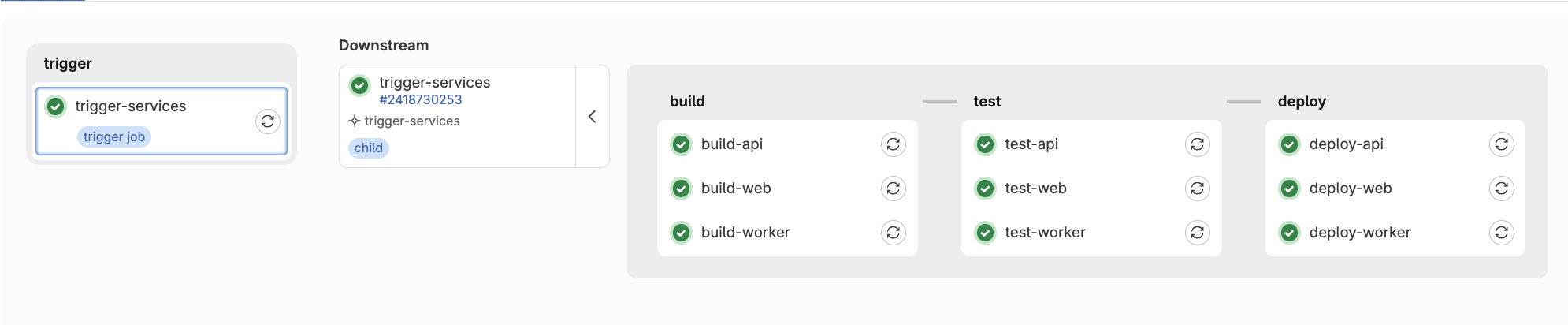 Local downstream pipelines
2. Microservices: Cross-repo, multi-project pipelines
The problem: Your frontend lives in one repo, your backend in another. When the frontend team ships a change, they have no visibility into whether it broke the backend integration and vice versa.
GitLab's multi-project pipelines let one project trigger a pipeline in a completely separate project and wait for the result. The triggering project gets a linked downstream pipeline right in its own pipeline view.
The frontend pipeline builds an API contract artifact and publishes it, then triggers the backend pipeline. The backend fetches that artifact directly using the Jobs API and validates it before allowing anything to proceed. If a breaking change is detected, the backend pipeline fails and the frontend pipeline fails with it.
      # frontend repo: .gitlab-ci.yml
stages:
  - build
  - test
  - trigger-backend

build-frontend:
  stage: build
  script:
    - echo "Building frontend and generating API contract..."
    - mkdir -p dist
    - |
      echo '{
        "api_version": "v2",
        "breaking_changes": false
      }' > dist/api-contract.json
    - cat dist/api-contract.json
  artifacts:
    paths:
      - dist/api-contract.json
    expire_in: 1 hour

test-frontend:
  stage: test
  script:
    - echo "All frontend tests passed!"

trigger-backend-pipeline:
  stage: trigger-backend
  trigger:
    project: my-org/backend-service
    branch: main
    strategy: depend
  rules:
    - if: $CI_COMMIT_BRANCH == "main"
      # backend repo: .gitlab-ci.yml
stages:
  - build
  - test

build-backend:
  stage: build
  script:
    - echo "All backend tests passed!"

integration-test:
  stage: test
  rules:
    - if: $CI_PIPELINE_SOURCE == "pipeline"
  script:
    - echo "Fetching API contract from frontend..."
    - |
      curl --silent --fail \
        --header "JOB-TOKEN: $CI_JOB_TOKEN" \
        --output api-contract.json \
        "${CI_API_V4_URL}/projects/${FRONTEND_PROJECT_ID}/jobs/artifacts/main/raw/dist/api-contract.json?job=build-frontend"
    - cat api-contract.json
    - |
      if grep -q '"breaking_changes": true' api-contract.json; then
        echo "FAIL: Breaking API changes detected - backend integration blocked!"
        exit 1
      fi
      echo "PASS: API contract is compatible!"
A few things worth noting in this config. The integration-test job uses $CI_PIPELINE_SOURCE == "pipeline" to ensure it only runs when triggered by an upstream pipeline, not on a standalone push to the backend repo. The frontend project ID is referenced via $FRONTEND_PROJECT_ID, which should be set as a CI/CD variable in the backend project settings to avoid hardcoding it.
Why it matters: Cross-service breakage that previously surfaced in production gets caught in the pipeline instead. The dependency between services stops being invisible and becomes something teams can see, track, and act on.
 Cross-project pipelines
3. Multi-tenant / matrix deployments: Dynamic child pipelines
The problem: You deploy the same application to 15 customer environments, or three cloud regions, or dev/staging/prod. Updating a deploy stage across all of them one by one is the kind of work that leads to configuration drift. Writing a separate pipeline for each environment is unmaintainable from day one.
GitLab's dynamic child pipelines let you generate a pipeline at runtime. A job runs a script that produces a YAML file, and that YAML becomes the pipeline for the next stage. The pipeline structure itself becomes data.
      # .gitlab-ci.yml
stages:
  - generate
  - trigger-environments

generate-config:
  stage: generate
  script:
    - |
      # ENVIRONMENTS can be passed as a CI variable or read from a config file.
      # Default to dev, staging, prod if not set.
      ENVIRONMENTS=${ENVIRONMENTS:-"dev staging prod"}
      for ENV in $ENVIRONMENTS; do
        cat > ${ENV}-pipeline.yml << EOF
      stages:
        - deploy
        - verify
      deploy-${ENV}:
        stage: deploy
        script:
          - echo "Deploying to ${ENV} environment"
      verify-${ENV}:
        stage: verify
        script:
          - echo "Running smoke tests on ${ENV}"
      EOF
      done
  artifacts:
    paths:
      - "*.yml"
    exclude:
      - ".gitlab-ci.yml"

.trigger-template:
  stage: trigger-environments
  trigger:
    strategy: depend

trigger-dev:
  extends: .trigger-template
  trigger:
    include:
      - artifact: dev-pipeline.yml
        job: generate-config

trigger-staging:
  extends: .trigger-template
  needs: [trigger-dev]
  trigger:
    include:
      - artifact: staging-pipeline.yml
        job: generate-config

trigger-prod:
  extends: .trigger-template
  needs: [trigger-staging]
  trigger:
    include:
      - artifact: prod-pipeline.yml
        job: generate-config
  when: manual
The generation script loops over an ENVIRONMENTS variable rather than hardcoding each environment separately. Pass in a different list via a CI variable or read it from a config file and the pipeline adapts without touching the YAML. The trigger jobs use extends: to inherit shared configuration from .trigger-template, so strategy: depend is defined once rather than repeated on every trigger job. Add a new environment by updating the variable, not by duplicating pipeline config. Add when: manual to the production trigger and you get a promotion gate baked right into the pipeline graph.
Why it matters: SaaS companies and platform teams use this pattern to manage dozens of environments without duplicating pipeline logic. The pipeline structure itself stays lean as the deployment matrix grows.
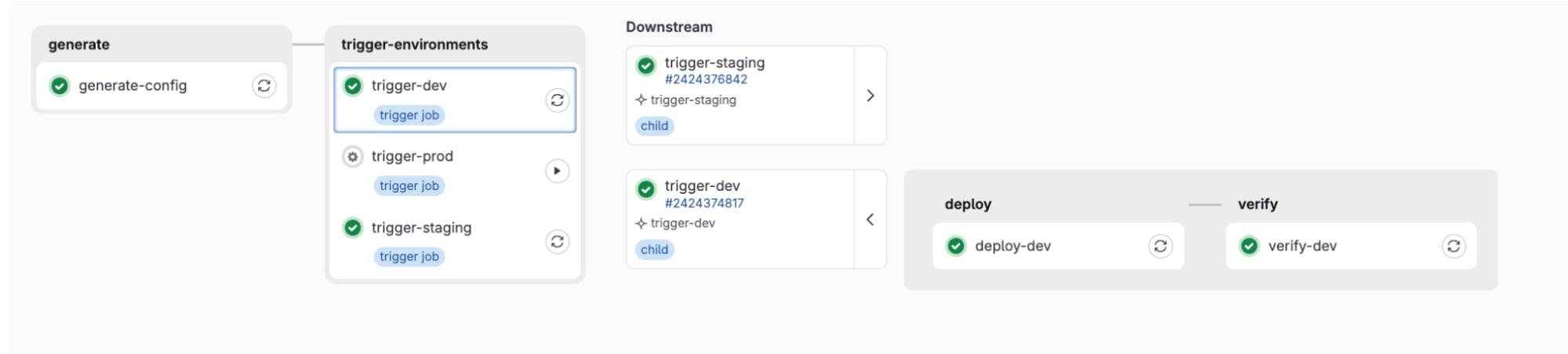 Dynamic pipeline
4. MR-first delivery: Merge request pipelines, merged results, and workflow routing
The problem: Your pipeline runs on every push to every branch. Expensive tests run on feature branches that will never merge. Meanwhile, you have no guarantee that what you tested is actually what will land on main after a merge.
GitLab has three interlocking features that solve this together:
- Merge request pipelines run only when a merge request exists, not on every branch push. This alone eliminates a significant amount of wasted compute.
- Merged results pipelines go further. GitLab creates a temporary merge commit (your branch plus the current target branch) and runs the pipeline against that. You are testing what will actually exist after the merge, not just your branch in isolation.
- Workflow rules let you define exactly which pipeline type runs under which conditions and suppress everything else. The
$CI_OPEN_MERGE_REQUESTSguard below prevents duplicate pipelines firing for both a branch and its open MR simultaneously.
With those three working together, here is what a tiered pipeline looks like:
      # .gitlab-ci.yml
workflow:
  rules:
    - if: $CI_PIPELINE_SOURCE == "merge_request_event"
    - if: $CI_COMMIT_BRANCH && $CI_OPEN_MERGE_REQUESTS
      when: never
    - if: $CI_COMMIT_BRANCH
    - if: $CI_PIPELINE_SOURCE == "schedule"

stages:
  - fast-checks
  - expensive-tests
  - deploy

lint-code:
  stage: fast-checks
  script:
    - echo "Running linter"
  rules:
    - if: $CI_PIPELINE_SOURCE == "push"
    - if: $CI_PIPELINE_SOURCE == "merge_request_event"
    - if: $CI_COMMIT_BRANCH == "main"

unit-tests:
  stage: fast-checks
  script:
    - echo "Running unit tests"
  rules:
    - if: $CI_PIPELINE_SOURCE == "push"
    - if: $CI_PIPELINE_SOURCE == "merge_request_event"
    - if: $CI_COMMIT_BRANCH == "main"

integration-tests:
  stage: expensive-tests
  script:
    - echo "Running integration tests (15 min)"
  rules:
    - if: $CI_PIPELINE_SOURCE == "merge_request_event"
    - if: $CI_COMMIT_BRANCH == "main"

e2e-tests:
  stage: expensive-tests
  script:
    - echo "Running E2E tests (30 min)"
  rules:
    - if: $CI_PIPELINE_SOURCE == "merge_request_event"
    - if: $CI_COMMIT_BRANCH == "main"

nightly-comprehensive-scan:
  stage: expensive-tests
  script:
    - echo "Running full nightly suite (2 hours)"
  rules:
    - if: $CI_PIPELINE_SOURCE == "schedule"

deploy-production:
  stage: deploy
  script:
    - echo "Deploying to production"
  rules:
    - if: $CI_COMMIT_BRANCH == "main"
      when: manual
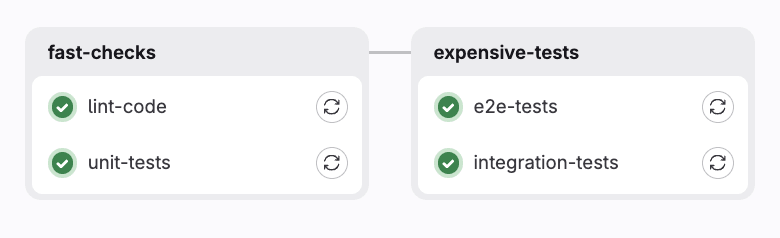
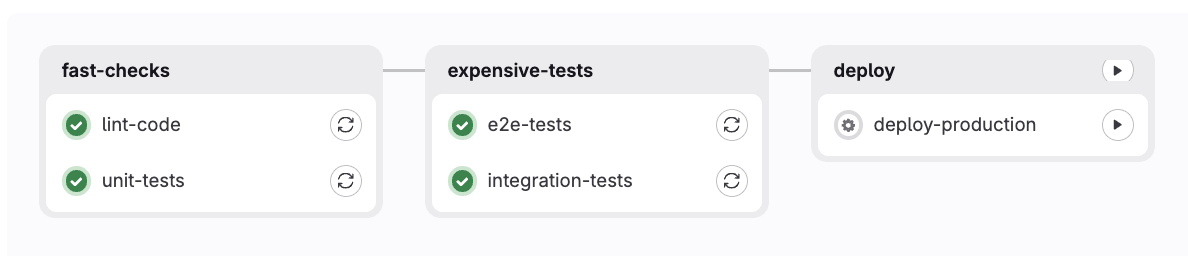
With this setup, the pipeline behaves differently depending on context. A push to a feature branch with no open MR runs lint and unit tests only. Once an MR is opened, the workflow rules switch from a branch pipeline to an MR pipeline, and the full integration and E2E suite runs against the merged result. Merging to main queues a manual production deployment. A nightly schedule runs the comprehensive scan once, not on every commit.
Why it matters: Teams routinely cut CI costs significantly with this pattern, not by running fewer tests, but by running the right tests at the right time. Merged results pipelines catch the class of bugs that only appear after a merge, before they ever reach main.
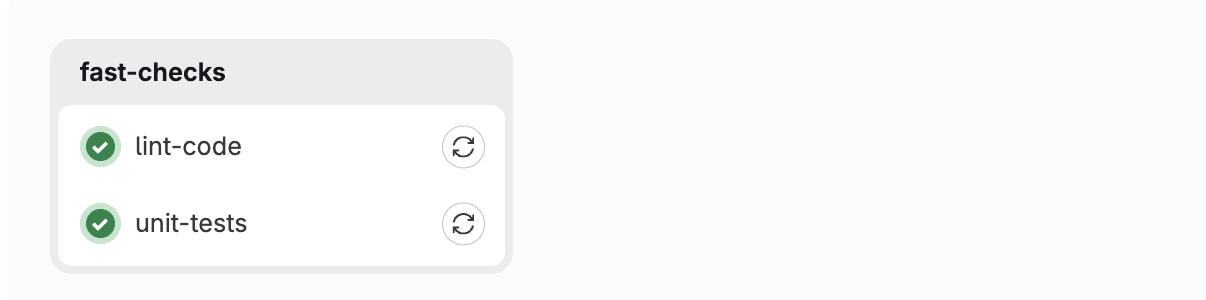 Conditional pipelines (within a branch with no MR)
 Conditional pipelines (within an MR)
 Conditional pipelines (on the main branch)
5. Governed pipelines: CI/CD Components
The problem: Your platform team has defined the right way to build, test, and deploy. But every team has their own .gitlab-ci.yml with subtle variations. Security scanning gets skipped. Deployment standards drift. Audits are painful.
GitLab CI/CD Components let platform teams publish versioned, reusable pipeline building blocks. Application teams consume them with a single include: line and optional inputs — no copy-paste, no drift. Components are discoverable through the CI/CD Catalog, which means teams can find and adopt approved building blocks without needing to go through the platform team directly.
Here is a component definition from a shared library:
      # templates/deploy.yml
spec:
  inputs:
    stage:
      default: deploy
    environment:
      default: production
---
deploy-job:
  stage: $[[ inputs.stage ]]
  script:
    - echo "Deploying $APP_NAME to $[[ inputs.environment ]]"
    - echo "Deploy URL: $DEPLOY_URL"
  environment:
    name: $[[ inputs.environment ]]
And here is how an application team consumes it:
      # Application repo: .gitlab-ci.yml
variables:
  APP_NAME: "my-awesome-app"
  DEPLOY_URL: "https://api.example.com"

include:
  - component: gitlab.com/my-org/component-library/[email protected]
  - component: gitlab.com/my-org/component-library/[email protected]
  - component: gitlab.com/my-org/component-library/[email protected]
    inputs:
      environment: staging

stages:
  - build
  - test
  - deploy
Three lines of include: replace hundreds of lines of duplicated YAML. The platform team can push a security fix to v1.0.7 and teams opt in on their own schedule — or the platform team can pin everyone to a minimum version. Either way, one change propagates everywhere instead of needing to be applied repo by repo.
Pair this with resource groups to prevent concurrent deployments to the same environment, and protected environments to enforce approval gates - and you have a governed delivery platform where compliance is the default, not the exception.
Why it matters: This is the pattern that makes GitLab CI/CD scale across hundreds of teams. Platform engineering teams enforce compliance without becoming a bottleneck. Application teams get a fast path to a working pipeline without reinventing the wheel.
 Component pipeline (imported jobs)
Putting it all together
None of these features exist in isolation. The reason GitLab's pipeline model is worth understanding deeply is that these primitives compose:
- A monorepo uses parent-child pipelines, and each child uses DAG execution
- A microservices platform uses multi-project pipelines, and each project uses MR pipelines with merged results
- A governed platform uses CI/CD components to standardize the patterns above across every team
Most teams discover one of these features when they hit a specific pain point. The ones who invest in understanding the full model end up with a delivery system that actually reflects how their engineering organization works, not a pipeline that fights it.
Other patterns worth exploring
The five patterns above cover the most common structural pain points, but GitLab's pipeline model goes further. A few others worth looking into as your needs grow:
- Review apps with dynamic environments let you spin up a live preview for every feature branch and tear it down automatically when the MR closes. Useful for teams doing frontend work or API changes that need stakeholder sign-off before merging.
- Caching and artifact strategies are often the fastest way to cut pipeline runtime after the structural work is done. Structuring
cache:keys around dependency lockfiles and being deliberate about what gets passed between jobs with artifacts: can make a significant difference without changing your pipeline shape at all. - Scheduled and API-triggered pipelines are worth knowing about because not everything should run on a code push. Nightly security scans, compliance reports, and release automation are better modeled as scheduled or API-triggered pipelines with
$CI_PIPELINE_SOURCErouting the right jobs for each context.
How to get started
Modern software delivery is complex. Teams are managing monorepos with dozens of services, coordinating across multiple repositories, deploying to many environments at once, and trying to keep standards consistent as organizations grow. GitLab's pipeline model was built with all of that in mind.
What makes it worth investing time in is how well the pieces fit together. Parent-child pipelines bring structure to large codebases. Multi-project pipelines make cross-team dependencies visible and testable. Dynamic pipelines turn environment management into something that scales gracefully. MR-first delivery with merged results ensures confidence at every step of the review process. And CI/CD Components give platform teams a way to share best practices across an entire organization without becoming a bottleneck.
Each of these features is powerful on its own, and even more so when combined. GitLab gives you the building blocks to design a delivery system that fits how your team actually works, and grows with you as your needs evolve.
Start a free trial of GitLab Ultimate to use pipeline logic today.
Read more
- Variable and artifact sharing in GitLab parent-child pipelines
- CI/CD inputs: Secure and preferred method to pass parameters to a pipeline
- Tutorial: How to set up your first GitLab CI/CD component
- How to include file references in your CI/CD components
- FAQ: GitLab CI/CD Catalog
- Building a GitLab CI/CD pipeline for a monorepo the easy way
- A CI/CD component builder's journey
- CI/CD Catalog goes GA: No more building pipelines from scratch
More to explore
View all blog posts


We want to hear from you
Enjoyed reading this blog post or have questions or feedback? Share your thoughts by creating a new topic in the GitLab community forum.
Share your feedback